Reviewed · KUALA LUMPUR TOURS
Malaysia eSIM (1 to 30 days. Up to 60GB of Data)
Malaysia eSIM is less a tour than a useful travel tool: you order before departure, scan a QR code, and carry your data plan in your phone. I like the instant email delivery and the choice of plans for short stays or trips of up to a month. I also like that the service offers up to 60GB of 4G/5G data, enough for maps, messages, bookings, and plenty of browsing.
The catch is simple but important: your phone must support eSIM, and high-speed data ends at the stated allowance. After that, the connection drops to 3G, so check the exact data limit and plan length before paying. The advertised duration also needs a close look, since the summary says 1 to 30 days while the description refers to 3 to 30 days.
In This Review
- Key points at a glance
- What this Malaysia eSIM actually is
- Choosing the right data and duration
- Getting the QR code before you leave
- Activating data after landing in Malaysia
- How the connection fits a Malaysia itinerary
- 4G and 5G performance in daily use
- Comparing $7.90 with the airport SIM option
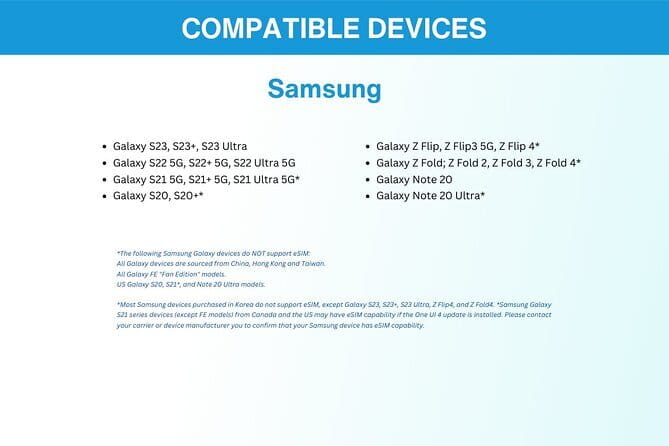
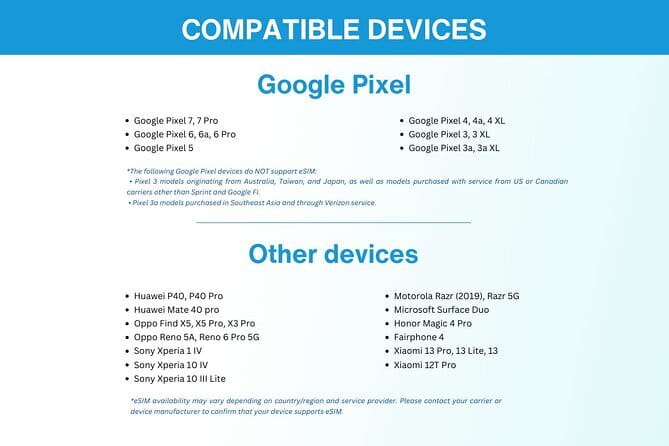
- Checking phone compatibility before booking
- Who should buy this plan
- Cancellation and small practical details
- Should you book the Malaysia eSIM?
- FAQ
- What is included with the Malaysia eSIM?
- Is there a physical SIM card to collect?
- How do I receive the eSIM?
- When should I set up the eSIM?
- Do I need internet access to activate the eSIM?
- What happens after I use all the high-speed data?
- Can I cancel for a full refund?
Key points at a glance
- Delivered by email: Your QR code arrives digitally, with no shop visit, pickup, or physical SIM to collect.
- Up to 60GB of data: High-speed 4G/5G is available until your selected allowance is used.
- Short and long options: Plans are offered for roughly 1 to 30 days, though you should confirm the exact choice at booking.
- Setup before departure: Install the eSIM on the day you leave, then activate data and data roaming after arrival.
- Useful across a Malaysia trip: The service is designed for city visits and journeys between cities, with reported stable service even in rural areas.
- Low starting price: At $7.90 per person, it can be good value if you need reliable data and avoid buying a local SIM on arrival.
What this Malaysia eSIM actually is
An eSIM is a digital SIM card built into a compatible phone. Instead of removing your home SIM and inserting a Malaysian one, you install a separate mobile plan by scanning a QR code.
That difference matters most at the airport. You can walk out with your own phone number still available for normal functions, while the eSIM handles mobile data. You do not need to find a shop, explain your data needs, wait for activation, or keep a tiny plastic SIM somewhere safe.
This is a purely digital product. There is no guide, vehicle, walking route, or physical meeting. Kuala Lumpur is shown as the starting location, and the Petronas Twin Towers are listed as the end point, but those details should not be treated as an actual meetup. You receive the service by email and set it up yourself.
I see this as a practical add-on to a Malaysia holiday rather than a sightseeing activity. It helps you check directions, contact accommodation, use ride services, translate signs, and send messages while moving around the country. You can use it in Kuala Lumpur, on road journeys, and in other areas where the supplied mobile service reaches.
Other Kuala Lumpur days worth putting on the list:
- Kuala Lumpur: Batu Caves Half-Day Tour with Pick-Up Option
★ 4.5 · 4,288 reviews - Private Half-Day Batu Caves and Cutural Tour in Kuala Lumpur
★ 5.0 · 3,107 reviews - Sambal Streets Kuala Lumpur Food Tour with 15+ Tastings
★ 5.0 · 2,438 reviews
Choosing the right data and duration
The available plans cover a short break through a stay of up to 30 days, with up to 60GB of high-speed data. The exact allowance depends on the option you select, so do not assume every $7.90 plan includes 60GB.
For light use, a smaller allowance may be enough. Maps, text messages, email, weather checks, and occasional browsing do not consume data quickly. If you upload lots of photos, make video calls, stream music, or watch video away from WiFi, a larger allowance makes more sense.
The high-speed limit is the main condition to understand. Once you use the stated amount, the connection changes to 3G. You may still have access, but pages can load more slowly and video use may become frustrating. I would choose a little more data than you think you need if you plan to use your phone as your main connection.
Duration matters just as much. A one-week visit does not need a 30-day plan unless the price difference is small and you want extra flexibility. At the same time, do not buy a plan that expires before your flight home if you need data for airport transfers or your final day.
There is a small inconsistency in the supplied information: the summary describes plans from 1 to 30 days, while the main description says 3 to 30 days. Check the exact duration shown for your chosen option before completing payment. That is a minor point, but it is the kind of detail that can affect a short weekend visit.
Getting the QR code before you leave
The eSIM is sent to you by email after booking. This is one of its strongest practical features. You do not have to wait for mail delivery or collect anything in Kuala Lumpur.
You need internet access to activate the eSIM. Install it before departure while you still have dependable WiFi, ideally on the same day you leave. The instructions specifically recommend setting it up on your departure date, which helps reduce the chance of starting the plan too early.
Print the QR code and carry the paper with you. You can also keep the email on another device, but a printed copy is a sensible backup if your phone is offline, damaged, or unable to display the code during setup.
The usual process is straightforward: open your phone’s mobile settings, choose the option to add a mobile plan or eSIM, scan the supplied QR code, and follow the prompts. Menu names vary by phone, so the exact screens may differ. The key point is that the eSIM is installed before you need it, while activation for Malaysian data takes place after you arrive.
Do not delete the eSIM after installation. If you remove it, the QR code may not work again, and you would need help from the provider.
Activating data after landing in Malaysia

After you reach Malaysia, activate the data plan and turn on data roaming for the eSIM. Your home SIM should not be selected for mobile data if you want to avoid possible charges from your usual carrier.
Phone settings are important here. Select the Malaysia eSIM as the mobile data line, and check that automatic data switching is disabled if your phone offers that setting. Otherwise, the phone may switch back to your home SIM when the eSIM signal changes.
This is the point where a little preparation saves time. Before leaving home, make sure you know how to access your phone’s SIM and mobile-data settings. Save the support email and QR code somewhere easy to find. The provider includes remote customer service, so you can ask for help if activation does not go as planned.
One customer had an activation issue but described the service as prompt and the connection as good after dealing with the problem. That suggests support is useful, but it also reminds me not to leave setup until the baggage carousel. Install the eSIM before you fly, then you only need to switch on the Malaysian data plan after landing.
Same city, a completely different kind of day:
- Historical Malacca Guided Day Tour (Shared Tour)
★ 5.0 · 2,172 reviews - Kuala Lumpur: Sambal Street Food Tour with 15+ Tastings
★ 4.9 · 1,657 reviews - Genting Highland & Batu Cave Guided Day Tour (SIC/Shared Tour)
★ 5.0 · 1,289 reviews - From Kuala Lumpur: Cameron Highlands Day Tour with Lunch
★ 4.3 · 1,178 reviews
How the connection fits a Malaysia itinerary
A data plan earns its keep in small moments. In Kuala Lumpur, you can check directions to the Petronas Twin Towers, look up opening details, message your hotel, or arrange transport without searching for public WiFi.
On a longer trip, the benefit is even clearer. The service is intended for use during journeys between cities, and one account described stable connectivity while moving between cities. Another reported good speed in rural areas. These are useful signs, but they are not a promise of perfect service in every Malaysian district or building.
Signal strength always depends on local coverage, terrain, buildings, and the network used by the eSIM. The available information does not name the Malaysian network or guarantee a particular signal level at every stop. I would still download essential maps, hotel details, and transport information before leaving WiFi.
The plan also helps you keep your usual communication habits. You can stay in touch with people at home, use messaging services, and make video calls when the connection allows. One account specifically described reliable 4G for streaming and video calls without interruptions.
That said, video uses data quickly. If you stream often, connect a laptop, or upload large files, your high-speed allowance may disappear sooner than expected. Use hotel or café WiFi for heavy downloads when available, and reserve the eSIM for navigation and essential communication.
4G and 5G performance in daily use

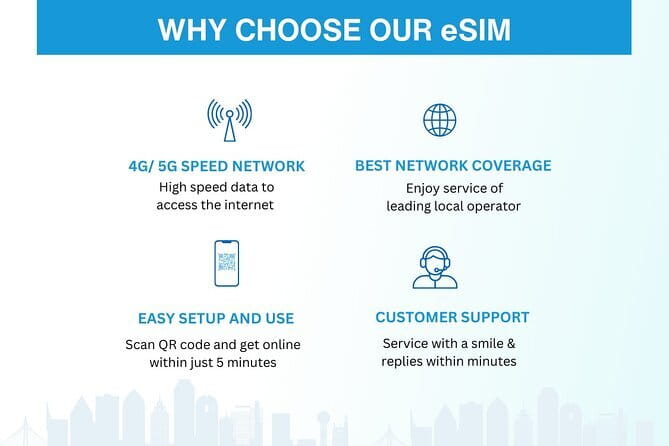
The product is advertised with 4G/5G access at local rates. In everyday terms, that should cover normal travel needs well: maps, web pages, email, messaging, social media, and online reservations.
The strongest praise concerns speed and stability. The supplied feedback includes reports of fast and reliable internet, 4G suitable for video calls and streaming, and a stable connection during travel between cities. One person described the speed as especially good outside major urban areas.
Those comments make this more than an emergency-only SIM. You can reasonably expect it to handle ordinary online travel tasks, provided your phone and the local network support the available connection. Still, mobile performance can vary. The service does not promise a fixed speed, and 5G may not be available in every place.
The high-speed cap is the line between a smooth experience and a slower one. After the chosen allowance is used, your speed switches to 3G. For a careful data user, that may never happen. For someone who streams daily or shares the connection with other devices, it deserves serious attention.
I would also avoid treating the eSIM as a replacement for every form of internet access. It is meant to provide mobile data for the duration you choose. The information does not say that hotspot use, calls, or text messages are included, so check those details if you need them.
Comparing $7.90 with the airport SIM option
The starting price of $7.90 is attractive because it pays for convenience as much as data. A physical local SIM may sometimes offer strong value, but you have to find a shop, compare packages, hand over your phone, and store your original SIM safely.
The eSIM cuts out that arrival chore. You can start using data quickly, and remote customer service is included if you need assistance. For a short visit, the time saved may matter more than a small price difference.
There are tradeoffs. A local physical SIM may include a local phone number, while the supplied information only promises mobile data. The eSIM also requires a compatible device, an email address for delivery, and internet access during setup.
At $7.90, I consider it good value for a basic short plan, particularly if you care about getting online as soon as you leave the airport. The value improves when you use the data for maps, communication, and bookings throughout a multi-city trip.
Before purchasing, compare the price of the exact duration and data allowance you need. The headline price is a starting point, not necessarily the cost of the 60GB or 30-day option.
Checking phone compatibility before booking

Compatibility is the most important question. Your smartphone or other mobile device must support eSIM technology. A phone that accepts only a removable SIM cannot use this product.
Your phone may also need to be unlocked for another mobile plan. The supplied details specifically tell you to double-check eSIM support and contact the provider if you are unsure. Do that before paying, not after the QR code arrives.
Look in your phone’s mobile settings for an option such as Add eSIM or Add mobile plan. You can also check your device documentation or ask the provider. The exact process differs by manufacturer, and the service does not list every supported model.
If you use a dual-SIM phone, the eSIM can be a convenient second line for data. You still need to select the correct line for mobile data and enable data roaming for the Malaysia plan after arrival.
Who should buy this plan
I would recommend this eSIM to you if you want a quick, low-fuss data connection and your phone supports the technology. It is especially handy for solo visitors, short-break visitors, and anyone moving between cities who does not want to search for a SIM shop.
It also suits people who need their phone for video calls, online bookings, maps, and regular messaging. The reported service quality makes it a reasonable choice for more than just occasional emergency use.
You may prefer a physical SIM if you need a Malaysian phone number, your phone does not support eSIM, or you want to speak with a shop assistant in person. This is also not ideal if you are uncomfortable changing phone settings or cannot access email and WiFi before departure.
Most people can use the experience, and confirmation is provided at booking. Still, the device check is not optional. It is the difference between a ready-to-use connection and a digital product you cannot install.
Cancellation and small practical details
Free cancellation is available when you cancel at least 24 hours before the experience start time. Cancellations made within 24 hours are not refunded, and changes during that period are not accepted.
Since there is no physical pickup or meetup, your real preparation is technical: confirm compatibility, watch for the email, install the plan on your departure date, and bring a printed QR code. The listed end point at the Petronas Twin Towers does not change that arrangement.
Should you book the Malaysia eSIM?
Book it if you want simple mobile data from $7.90, have a compatible phone, and value arriving in Malaysia already prepared. The best parts are email delivery, quick setup, flexible duration, and strong reported 4G performance, including during movement between cities and in some rural areas.
Pause before booking if you need calls or a local number, if your device may be locked, or if you expect to consume a great deal of video data. Confirm the exact plan length, data allowance, and post-cap speed before checkout.
For most visitors who want maps, messages, bookings, and dependable internet without an airport SIM hunt, this is a sensible purchase. Just install it before flying and manage your data use carefully.
FAQ
What is included with the Malaysia eSIM?
You receive mobile data for the duration you select, delivery of the eSIM by email, and remote customer service.
Is there a physical SIM card to collect?
No. This is a digital product, so there is no pickup, meetup, or physical SIM delivery.
How do I receive the eSIM?
You receive a unique QR code by email after ordering. You scan the code with a compatible device to install the plan.
When should I set up the eSIM?
Set it up on the same day as your departure. After reaching Malaysia, activate the data plan and enable data roaming.
Do I need internet access to activate the eSIM?
Yes. Internet access is required during activation, so WiFi is recommended when you install it.
What happens after I use all the high-speed data?
After the stated high-speed allowance is used, the connection changes to 3G.
Can I cancel for a full refund?
Yes, if you cancel at least 24 hours before the experience start time. Cancellations within 24 hours are not refundable.
Just added around Kuala Lumpur
- Transit Tour Private Tour (Ex Port Klang Cruise Centre/KLIA 1 &2)★ 5.0 · 10 reviews
- Kuala Lumpur City & Batu Caves Temple Private Tour★ 4.5 · 3 reviews
- Private Kuala Lumpur Shore Excursions★ 4.5 · 22 reviews
- Private Transfer: Kuala Lumpur International Airport to or from Hotel★ 4.5 · 14 reviews
- Genting SkyWorlds Theme Park Tickets (Optional)★ 5.0 · 5 reviews
- Full Day Melaka Private Tour from Kuala Lumpur★ 4.0 · 5 reviews
- Private Port Klang Cruise to Kuala Lumpur City Tour★ 5.0 · 3 reviews
- Kuala Lumpur Airport Transit Tour (4 hours)★ 5.0 · 12 reviews
Kuala Lumpur Tours, compared.


Private Half-Day Batu Caves and Cutural Tour in Kuala Lumpur
Read our review →
Sambal Streets Kuala Lumpur Food Tour with 15+ Tastings
Read our review →
Historical Malacca Guided Day Tour (Shared Tour)
Read our review →

Genting Highland & Batu Cave Guided Day Tour (SIC/Shared Tour)
Read our review →